Private transcription for your calls and recordings.
Earshot turns meetings, calls and voice recordings into searchable, timestamped transcripts, entirely on your own computer. Nothing is uploaded, there's no subscription and no storage fees, and after a one-time setup it works with the internet unplugged.
- One-time price
- Full source code
- No cloud, no account
- Works offline
From recording to transcript
Record a call or drop in a file. Earshot does the rest.
Record any call
One click records your microphone and the other people on a Zoom, Microsoft Teams or Google Meet call. No bot joins your meeting. On a Mac, recording other apps needs the free BlackHole audio driver.
Automatic import
Earshot watches the folders where Zoom, Teams (OneDrive) and Google Meet (Google Drive) save recordings, and transcribes new ones automatically. Or drag in any audio or video file: MP3, M4A, WAV, MP4, MOV, MKV and more.
Accurate transcripts
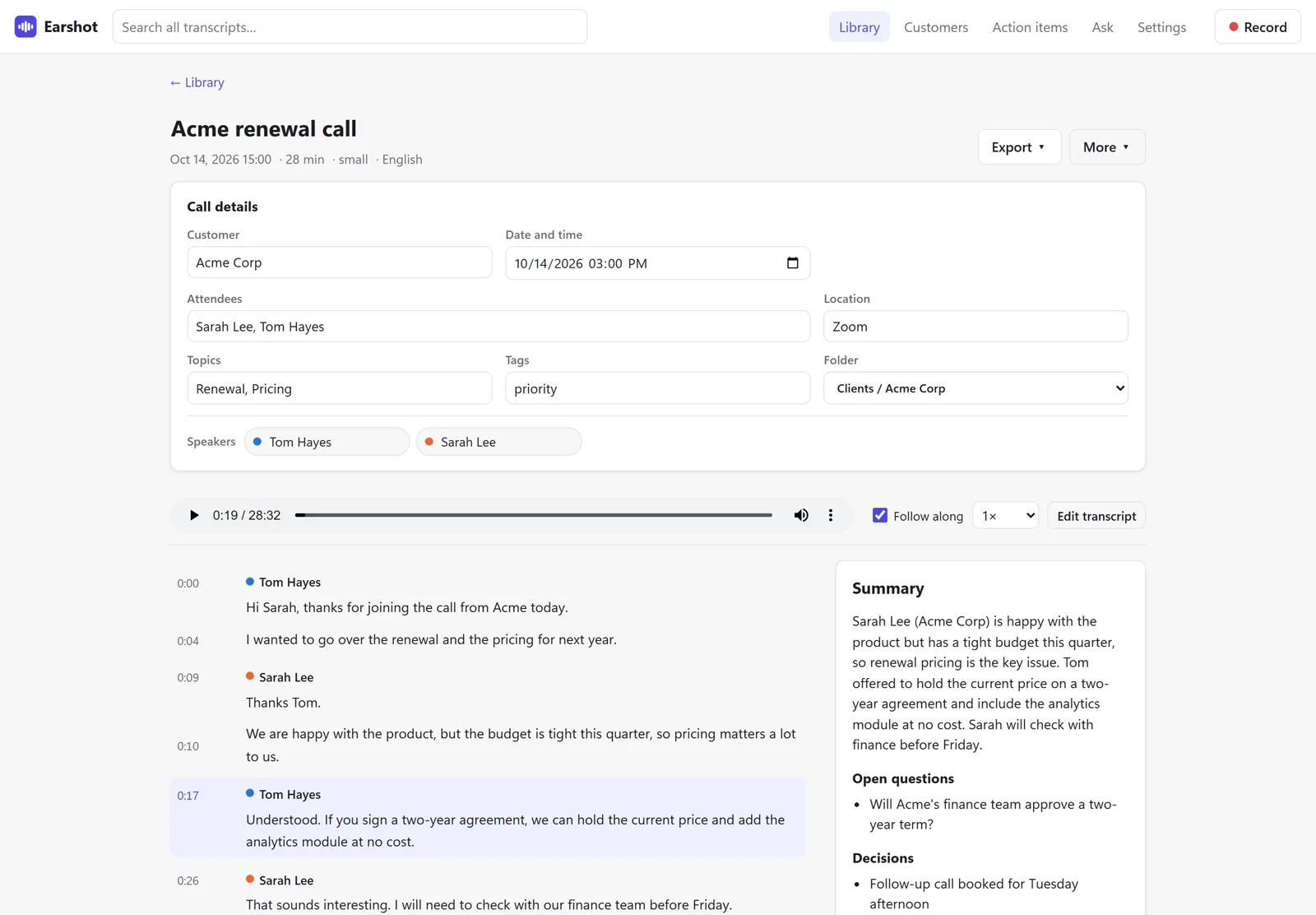
Powered by OpenAI's Whisper speech model, running locally. Each line highlights as it plays; click any line to jump there, and edit lines to fix mistakes.
Speaker labels
See who said what, and rename a speaker once (“Speaker 2” becomes “Sarah”).
Calendar matching
Connect your Google, Outlook or iCloud calendar, and each recording gets its meeting's title, attendees, location and customer filled in.
Organize and export
Folders, tags and full-text search. Export to Word, Markdown, text, SRT or VTT subtitles, or CSV for spreadsheets and CRMs.
Every call, in context
Earshot keeps track of the people and customers behind your calls, so nothing slips.
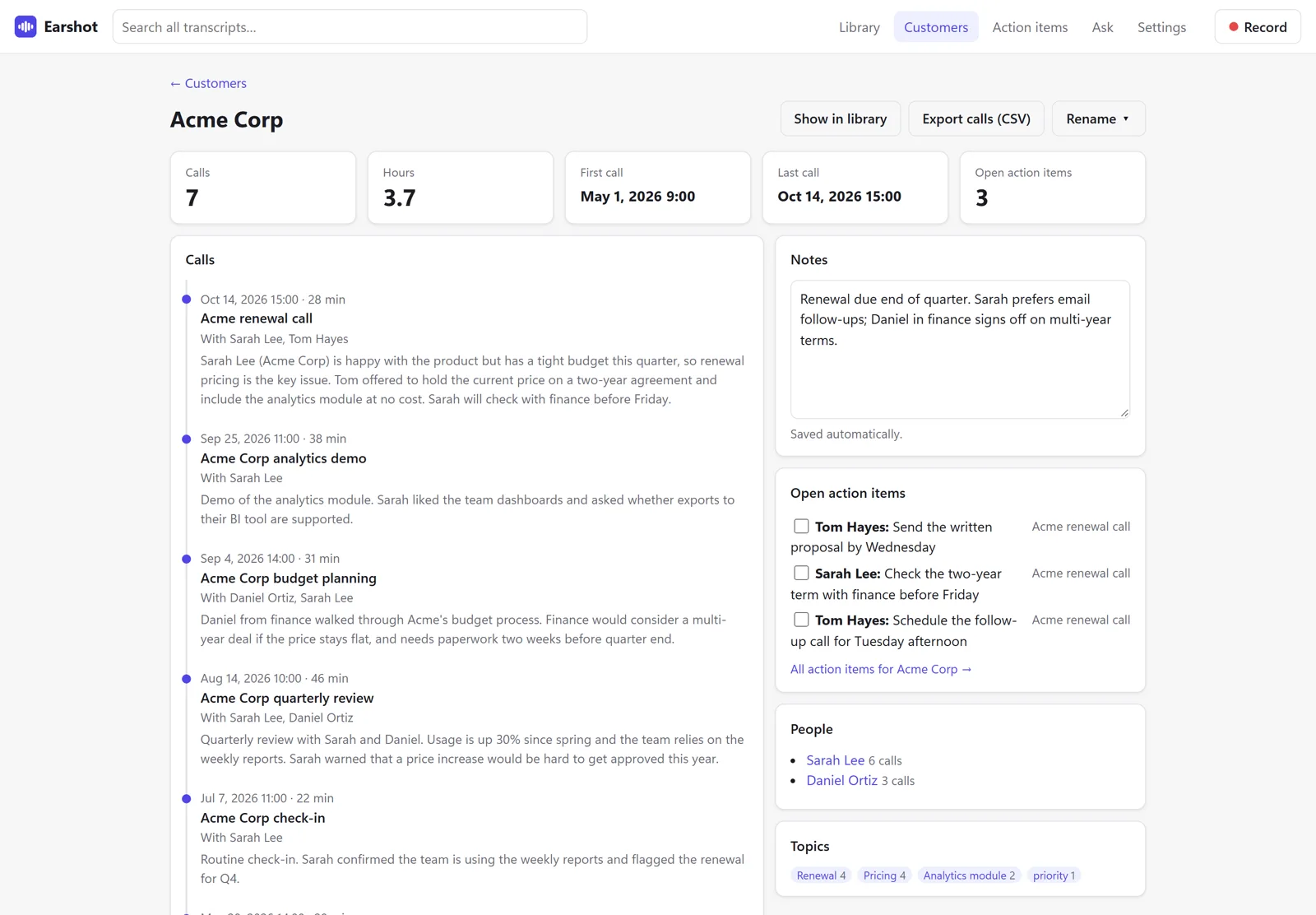
Customer pages
Every customer gets a page with all their calls, time spent, people, topics, open action items and notes.
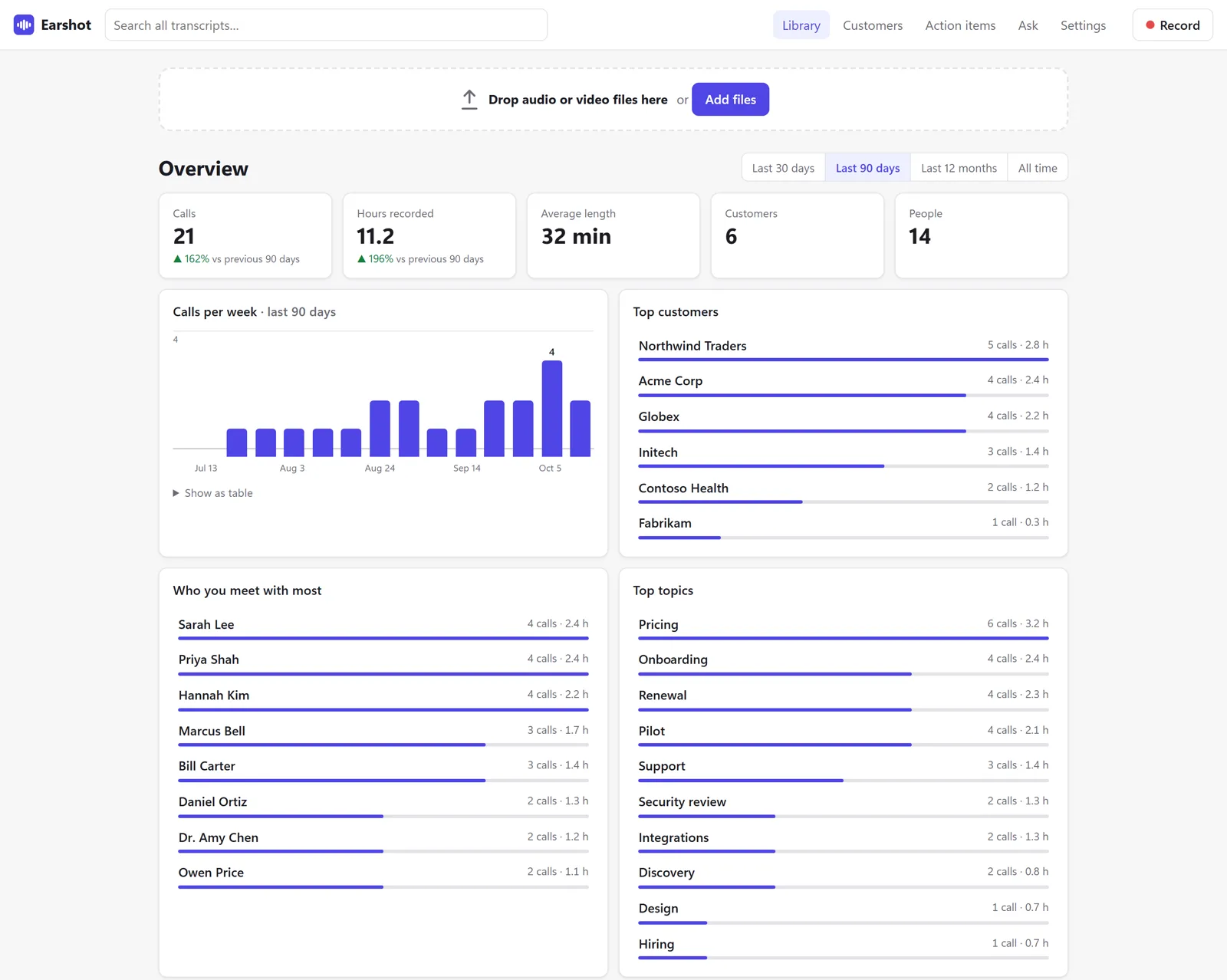
Home dashboard
Calls and hours over time, your top customers, who you meet with most, and your top topics.
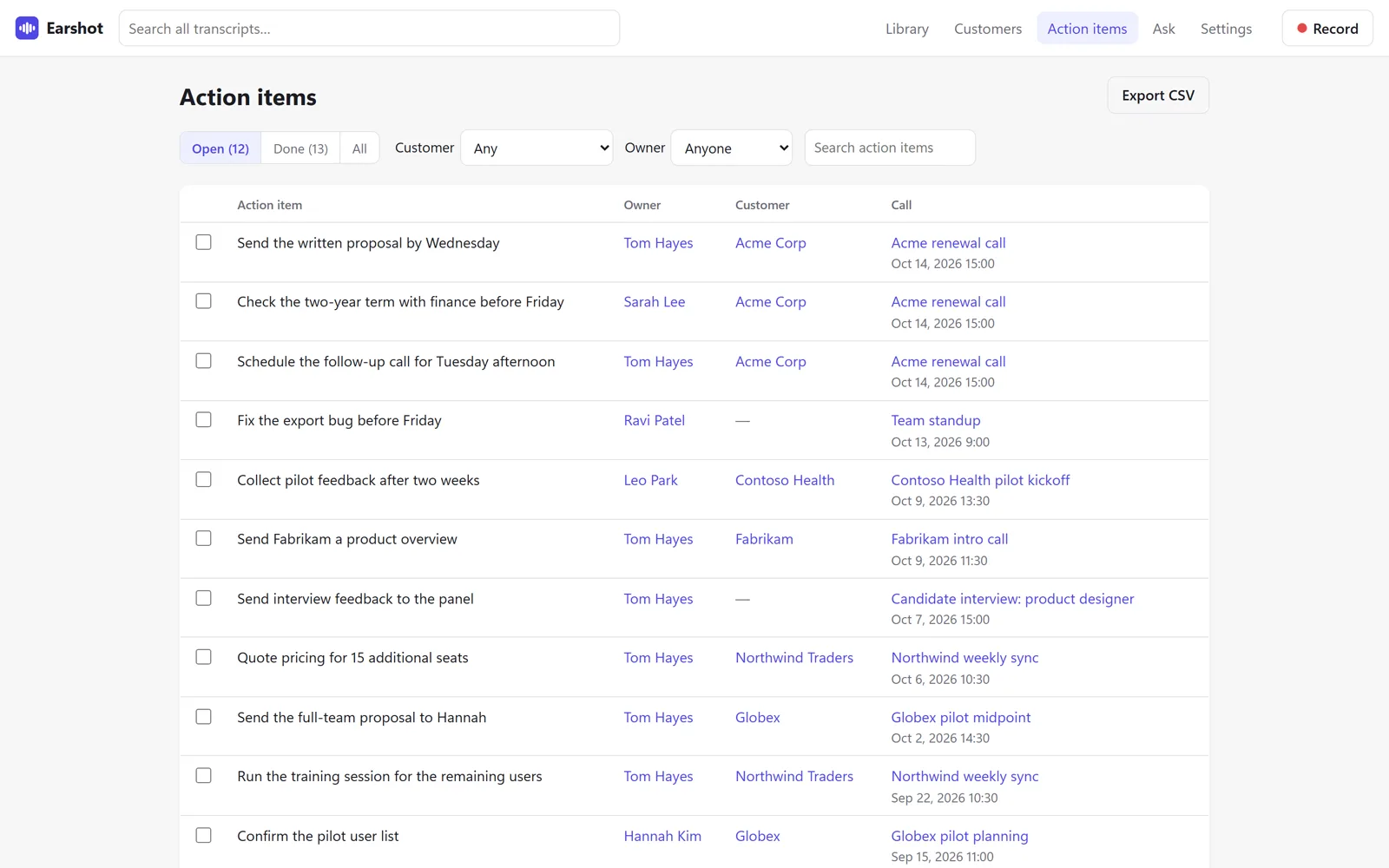
One action-items list
Every follow-up from every call in one place. Tick items off or add your own.
For the conversations that matter
Legal and confidential work
Client calls are transcribed on your computer, never sent to a cloud service.
Family memories
Record conversations with your kids and keep every word to look back on.
Customer calls
A searchable record of every call, client and follow-up.
Ask your calls a question.
AI summaries and action items*
Summaries, key points, decisions and action items, written by a free local AI (Ollama). No data is sent out.
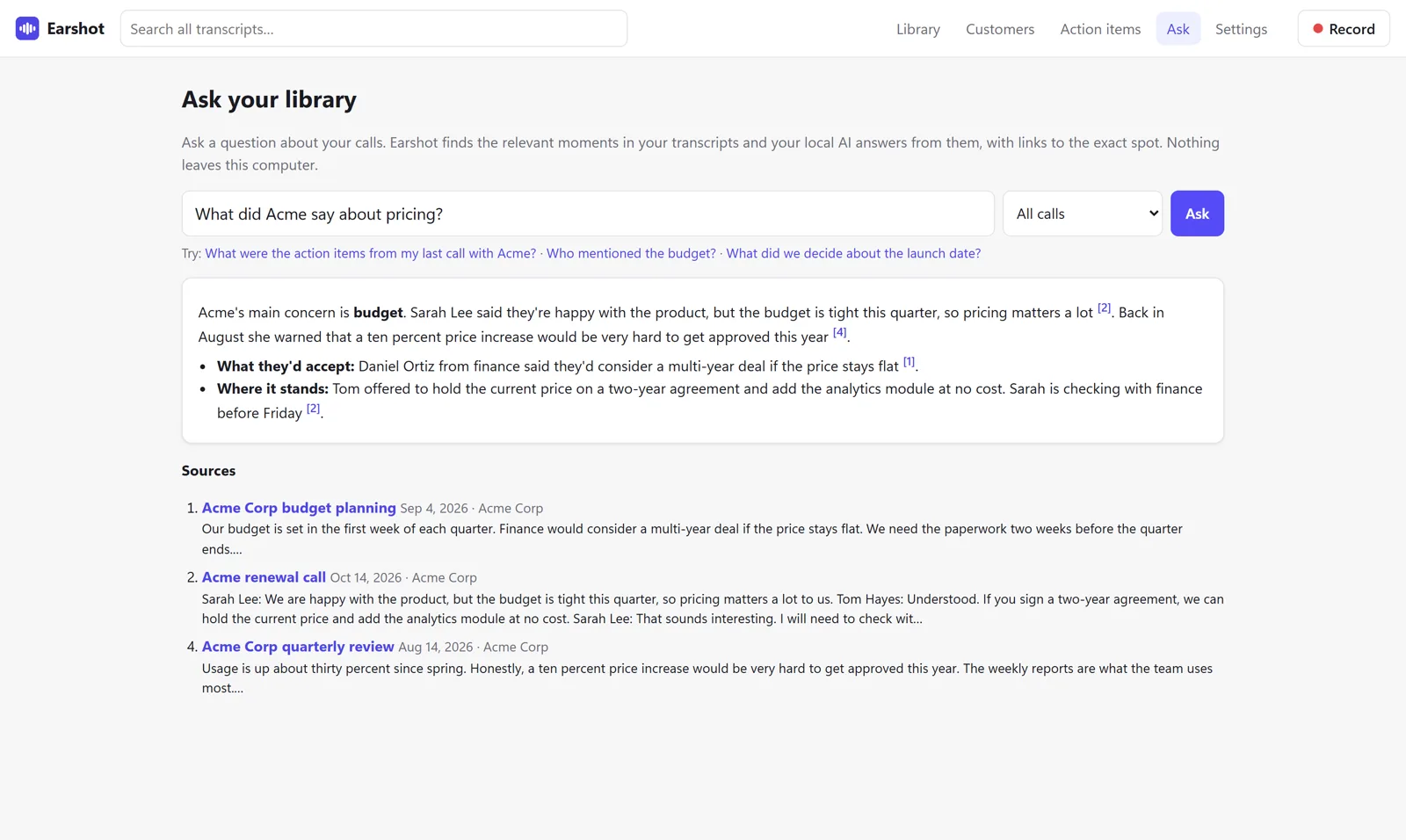
Ask your library*
Ask “What did Acme say about pricing?” and get an answer from your own transcripts, with links to the exact moments.
* Optional. Needs the free Ollama app, which runs the AI on your own computer. Transcription works without it.
Customize Earshot with your own coding agent
You get every line of code, so you're never stuck with how it ships. Point a coding agent like Claude Code or Codex at the folder and describe what you want in plain English. No coding experience needed.
Your recordings never leave your computer.
Earshot is built for conversations that shouldn't be uploaded anywhere: legal, medical, HR, therapy, research, and sales and client calls. It's also a calm way to keep a record of every customer call, or to transcribe personal and family recordings.
Nothing uploaded
Transcription runs on your own computer. Your audio and transcripts stay there.
No account
You don't need to sign up for anything to use Earshot.
No tracking
There's no telemetry and nothing that reports how you use the app.
Works offline
Your license is checked once at activation and keeps working offline.
What you'll need
Check these before you buy.
- A Windows, Mac* or Linux computer
- Windows 10 or 11 (64-bit), macOS 12 or newer (Apple Silicon or Intel), or Linux. 8 GB of memory (16 GB recommended) and about 2 GB of disk space, plus room for your recordings.* On a Mac, recording the other people on a Zoom, Teams or Meet call needs the free BlackHole audio driver. Without it, Earshot records your microphone only.
- About 10 minutes to install
- Download the zip, put the folder where you want Earshot to live, and run the installer: double-click on Windows, or one command on Mac and Linux. Nothing else needs installing first. Most of the time is spent downloading.
- Internet, just once
- Only for installing, activating and the one-time speech model download. After that, Earshot works offline.
- Optional: an NVIDIA graphics card
- Makes transcription faster and is used automatically when present. It isn't required.
- Optional: the free Ollama app
- Needed for AI summaries and Ask. Transcription works without it.
Earshot
One-time payment, activates up to 3 computers
- Full source code download
- Desktop app for Windows, Mac and Linux
- One license key for up to 3 computers
- No subscription or storage fees
- Works offline after setup
By buying you agree to the license terms.
Earshot questions
The details worth knowing before you buy.
Is Earshot similar to Gong, Otter or Fireflies?
Somewhat. Like those services, Earshot turns your meetings into transcripts with summaries and action items. The difference is where it happens: your recordings and transcripts are stored locally, and nothing is saved to the cloud. Instead of adding itself to your meetings, Earshot watches the recording folders you choose and transcribes new files automatically.
Can Earshot record the other people on my calls?
Yes. One click records your microphone and the other people on a Zoom, Teams or Google Meet call. On a Mac, recording the other side of a call needs the free BlackHole audio driver. Without it, Earshot records your microphone only.
Does Earshot connect to my Zoom, Teams or Google Meet account?
No. Earshot never signs in to Zoom, Teams or Google Meet, and no bot joins your meetings. Instead, it watches the folders where those apps save recordings, such as Zoom's recordings folder, OneDrive for Teams and Google Drive for Meet, and transcribes new files as they appear. You can also record a call yourself with one click, or drag in any audio or video file.
Do I have to tell people I'm recording?
Yes, always tell people. Earshot doesn't notify meeting participants that you're recording, and no bot joins the call. Recording laws vary by place, so check the rules that apply to you.
Do I need Ollama?
Only for AI summaries, action items and Ask. Ollama is a free app that runs the AI on your own computer. Transcription works without it.
Does Earshot need the internet?
Only for installing, activating your license and the one-time speech model download. After that, it works with the internet unplugged.
How many computers can I use it on?
One license key activates Earshot on up to 3 computers.
Is anything sent to NewcombLabs?
No. Your audio and transcripts never leave your computer, there's no account, and there's no telemetry or tracking. The only check is your license, once, at activation.
Earshot reviews
Bought Earshot? Tell other people what you think.
No reviews yet. Be the first to share how Earshot is working for you.